


August 29, 2024 in Computing
Big Tasks for Small Computers
SHARE: PRINT ARTICLE: https://doi.org/10.1287/orms.2024.03.01
Most current ideas about computing seem to revolve around the notion of putting together an optimal computer for a specific – generally cutting-edge, “big data” – task. For the past couple of years, I have focused on the following question:
What is the “best thing” I can get the “worst computer” to do?
This piece is a sampler of technical advice, philosophy and the story of running generative text-to-image artificial intelligence (AI) on an $80 single-board computer (SBC). As analytics professionals, we should care – if not about the coding and specific technical aspects, then about the idea that we can push the threshold of computing far closer to the “edge” than many of us think possible. Your next computer might not look at all like a “computer.” Additionally, and more importantly, this brings into sharp focus the democratization of AI, by which we mean the ability to put AI in the hands of the average citizen, not just something that is accessible to elites via the web.
Small Computers
I was first made aware of single-board computers as part of my work with a local high school robotics team [1]. High school students have a tinkerer’s mindset combined with refreshing optimism. Over the past year, I have worked with boards from Raspberry Pi, Orange Pi, Arduino, Google Coral and NVIDIA Jetson Products. Each system brings its own nuanced advantages and disadvantages. In my opinion, NVIDIA boards are by far the best technical hardware but are also the most temperamental. Arduinos are microcontrollers that think they might be computers; Raspberries are computers that think they might be microcontrollers. The choice in hardware is a balance between your experience, technology requirements and ease of use. That last factor is the driver for me, and the remainder of this piece will focus on the Raspberry Pi models Zero 2 and 5. Whatever hardware you choose, there really is no substitute for jumping in with both feet, buying a few boards and seeing what you can get them to do. For example, the first draft of this article was written on a $15 Raspberry Pi Zero 2 running OpenOffice. Don’t think of the nominal amount of money you spend as an investment in hardware; consider it instead as tuition for a course in computing.
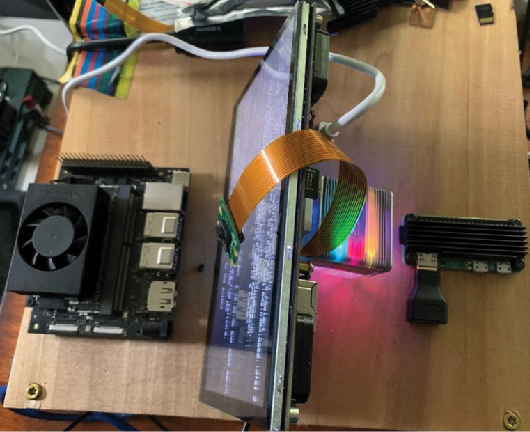
The Challenge: Run Generative AI on an SBC That Costs Less Than $100
This project started with running large language models (LLMs) on the Pi, then moving to image-to-text (using Language-and-Vision Assistant [LLaVa]) and finally, text-to-image as a graduation exercise. This was the order in which these tasks were accomplished. The development cycle was as follows:
- Find an AI application that looks interesting.
- Experiment with it in it’s native – generally web – environment.
- Run it locally on PC.
- Experiment with increasing efficiency to get it to run on an SBC.
- Install and run on SBC.
For context, it took a matter of weeks to achieve each of these milestones. The hard parts were not finding the (mostly) ready-made code on various Git repositories. Frequently, the hard parts were finding and successfully loading the supporting elements. The need for specific tools, such as “git-lfs” – as well as specific compiler instructions, such as toolchains for processors – was frustrating and time-consuming. The reward was, in my opinion, worth it.
Barriers to Entry
Barriers exist in any worthy pursuit; the most critical ones here are not technical nor policy so much as – in my opinion – mindset. It is nigh impossible to do anything with these systems without directly interacting at the command line. Many professionals – particularly younger ones – with a pure analytics background may have never seen a “naked” command line. Think of the last time you needed – or were even able to access – a “true” command prompt in Windows or Mac.
There are also important policy barriers to overcome. Many centrally managed IT systems will not allow individuals to write an operating system to a micro-SD card because of security considerations. This is an absolute requirement for each of these computers, because the micro-SD card is the hard drive. Furthermore, these networks frequently will not allow users to connect these boards; this can lead to frustrating and admittedly comical practical discussions about what is and what is not a computer [2].
Run Fast, Die Young!
I frequently reassure my students that “there’s nothing you are going to do from the keyboard that will fundamentally damage this machine.” This is (generally) true for PCs and Macs, but not for SBCs. The types of computers that we have grown accustomed to using insulate the critical hardware settings from the user [3]; SBCs intentionally make these easily accessible to the user. For example, it is easy to “overclock” these boards, by which I mean adjust the clock speed away from the design specification. I boosted the speed of the board I’m writing this article on from 1.0 GHz to 1.3 GHz with an accompanying increase in operating voltage. This is the second board I have tweaked in this manner. The first one ceased to function because of overheating (I think? It wasn’t worth my time to conduct a postmortem on a $15 computer). Think of overclocking as giving your computer crystal meth. It will make it work faster, run hotter – and have a shorter life. I don’t want to contribute to computer delinquency, so if you are interested, you can easily find the instructions on the internet.
Key Technical and Nontechnical Skills for Working in SBCs
First, the most important skill for these computers is not a technical one (see below). However, the tools that are needed include: Some familiarity with Python and some familiarity with Linux [4]. It is also important and useful to have a smattering of lower-level languages, such as Java or C++. Although you will not frequently code in them, you will have to interact with them when loading/updating packages.
Tenacity is by far the most important attribute, but the technical skill required to get started, beyond basically plugging things in, is to be able to “flash” an operating system to a micro-SD card. The tools I have used for this are Raspberry Pi Imager and Balena Etcher. From there, a little bit of Linux programming is necessary. You will make excessive use of:
- Sudo apt update.
- Sudo apt-get upgrade.
The experience of working with these systems is as follows: Imagine you are looking at a magazine, and you see an image of a really cool car driving up the side of a mountain. The car is a special, low-production model, so you have to order it. The car is delivered. Excited, you run out and turn the key, and instead of the hum of a happy engine, you see before you an entire array (pilots refer to this as a “Christmas tree”) of warning lights. The manufacturer doesn’t answer their phone, and the help page is not very helpful. After some digging, you find one forum where it is pointed out that you should check to see if the oil filter is installed. You go out and discover that there is no oil filter, so you install it, and you’re ready to go.
Again, you put the key in the ignition; this time, the same lights light up! Dig around again, and you find that although oil is necessary for the car to run, the manufacturer didn’t want to presume the kind of oil you would want, so you have to add it yourself. So you do that.
Again, you put the key in the ignition; this time, different lights light up! More research reveals that although you have oil and a filter, the oil and filter do not work together, and you have to replace both.
Finally, you put the key in the ignition and the car starts. As you drive to the hill you want to climb, you realize halfway that the tires are wrong; the right tires – although pictured in the magazine – are no longer made, and in any case don’t fit the axles of your car. So, you have to go all the way back and start again.
If this sounds like fun, SBCs are for you!
Success at Long Last
After a few months of on-again, off-again tinkering, I was able to achieve my original challenge via the following three increasingly difficult tasks, all completely isolated from network connectivity:
1. Interactive generative AI chatbot written in Python based on tinyllama. The user types in a question, and the AI answers it both in text and reading the answer aloud. Runtime: 1-2 minutes.
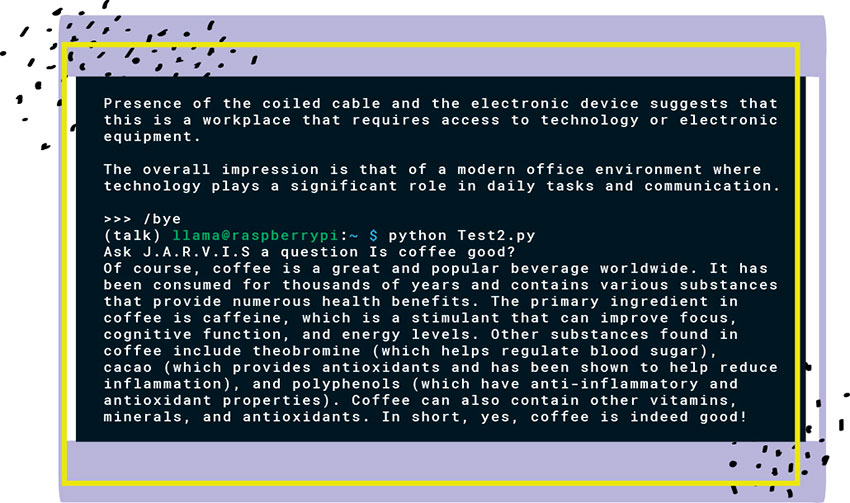
2. Image-to-text description based on LLaVa. The user points the attached camera toward something they want to analyze, and the computer generates an (astonishingly high-quality) description of the scene. Runtime: 5-9 minutes.
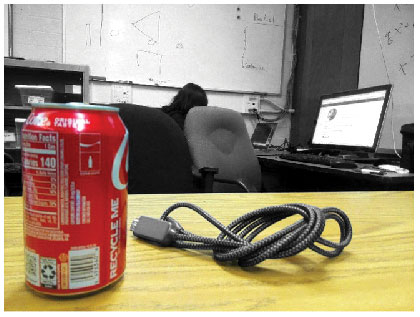
In the image, there is a person sitting at a desk with a computer monitor and keyboard. The individual appears to be using the computer, as evidenced by their posture and focus on the screen. There’s also a can of soda on the desk, which suggests that the person might be taking a break or enjoying a drink while working.
On the table in front of the computer, there’s a coiled black cable with a small silver device connected to it. The device is not clearly identifiable from this angle, but it could possibly be a USB hub or some type of external drive or hardware.
The room has a whiteboard on the wall behind the desk, and there are some papers or notes pinned up on it, indicating that this space might be used for brainstorming, planning, or other collaborative work. The presence of the coiled cable and the electronic device suggests that this is a workspace that requires access to technology or electronic equipment.
3. Text-to-image based on stable diffusion. The user types in a prompt, and the computer generates an image based on this. Runtime: 3-5 minutes.


Figure 4. Generative AI response to the prompts: A cat riding a bicycle on the surface of the sun” (left) and “A goat and a mule playing football” (right).
Getting Started
There are some excellent guides and “maker pages” for getting started in this space. Having said that, the guides all have two things in common. First, they are written by people who have already succeeded in getting the computers to work, which means they are written from a point of view that is fundamentally different than a neophyte. Second – and this is the frustrating part – each of these guides is a “snapshot” in time; specifically, the Operating System build, programming language (usually Python) build, package builds and sometimes the time of day. Some rework is generally required, and this rework is more like “hacking” than anything taught in a formal academic setting.
If you are thinking about getting started in this field, first, you can’t say that you weren’t warned. Having made that disclaimer, we can nominate a first project. When people come to me and want to talk about getting started, I recommend RetroPie [5], which is a classic console emulator. It makes you go through the basic steps of installation, and it works. For additional information, see the manufacturer’s webpages [6-8].
Notes & References
- FIRST Team 5104 – BreakerBots. Specifically, Roman and of course, Walter.
- “If it’s not in a box or a laptop, it’s not a computer.”
- If you don’t believe me, try to manually edit the registry on a Windows machine!
- Debian (RPI) and Ubuntu (NVIDIA) are similar enough that you will think they are the same… until you start getting errors.
- https://retropie.org.uk/
- https://www.raspberrypi.com/
- https://www.nvidia.com/en-us/autonomous-machines/embedded-systems/jetson-orin/
- https://www.arduino.cc/
Harrison Schramm, CAP, PStat, is a senior lecturer at Naval Postgraduate School, splitting his time between Defense Management and Operations Research where, in addition to teaching, he runs the Contested At-Sea Logistics Lab (CASLL). He served as the inaugural chair of the INFORMS Security Conference and is a past president of the INFORMS Analytics Society.
([email protected])