
December 4, 2024 in Git Flow
Ops Researchers, It’s Time to Git with the Flow
SHARE: PRINT ARTICLE: https://doi.org/10.1287/orms.2024.04.05
A manager once told me, “Your model provides no value until it’s in production and making decisions. Until then, it’s simply a cost.” As operations researchers and decision scientists, we are efficiency experts. We create algorithms that make routes for food delivery, design schedules for healthcare workers, and set prices for goods and services. But how often do we find inefficiencies in the paths those algorithms take to production?
Decision science/operations research (DS/OR) as a discipline is ubiquitous yet often unrecognized and lags data science in terms of broader adoption [1]. One reason for this: Inefficiencies in productionalizing DS/OR decision algorithms. It can take months to get new or updated models into production and live in a business process. Model code is developed on local machines, passed around as zip files via email for review, with one-off tests that are hard to repeat, and handed off to software teams to deploy with little context about the code and lots of dependency juggling – and hoping it doesn’t break. As a result, decision models have to overcome a series of speed bumps to get into production and show value.
So, what can we as DS/OR practitioners do to efficiently deliver more model code and model value? A first step: Adopt modern Git practices and unlock downstream efficiencies with continuous integration/continuous delivery (CI/CD) and automated testing. In this article, we will explore the basic concepts of Git, how it simplifies stakeholder interfaces and communication, and how it helps DS/OR practitioners realize the value of their models faster, more consistently and more frequently.
Git Basics for DS/OR
Git is an open-source version-control solution created by Linus Torvalds (also of Linux fame) in 2005 [2]. Developed as an alternative to centralized control systems such as Subversion (or SVN), Git offers a distributed approach to software version control that has gained wide adoption and has become today’s industry standard.
Popular solutions that host and add functionality on top of Git include GitHub, GitLab and Bitbucket. Although you don’t need GitHub to use Git, you do need Git to use GitHub. And, as with any practice, there’s a whole lingo learning curve to overcome. Let’s explore a few terms and concepts to be familiar with in the context of DS/OR.
Repositories
Repositories (or “repos”) in GitHub or Bitbucket (or “projects” in GitLab) are where a given project’s source code, data files and related artifacts reside. There are different approaches for how DS/OR teams use repos: Some may have a separate repo for each decision model (e.g., a delivery routing repo and a shift scheduling repo), whereas others may combine models into a single repository called a “monorepo.”
Branches
Branches are workspaces within a repository for a dedicated line of development. Branch names are flexible. It is common to have a main or stable default branch, staging or release branch, development branch, feature branches and so on. Branches unlock the ability for several teammates to work concurrently within a single repository with multiple tracks of development and no need for code freezes.
Pull Requests
Pull requests (PRs) (or merge requests, depending on the platform) are how you submit code changes for automated checks and manual peer review to subsequently merge into another branch. Peers will either approve the changes or send them back for further iteration.
Let’s look at these terms in context: Imagine you’re a modeler working on a vehicle routing model. You’re updating the model to include a dedicated break time constraint to alleviate driver burnout. Because it’s an existing project, you already have a “Delivery Routing” repo to work within. Here is what the Git flow looks like for this simple example.
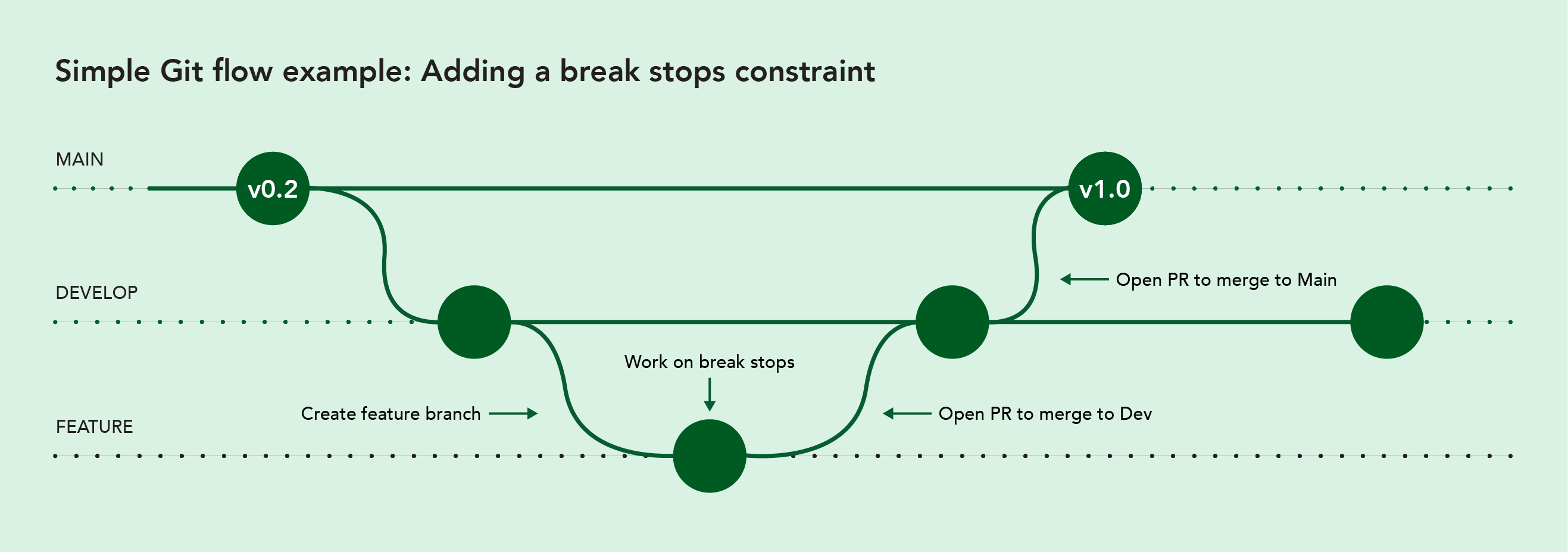
As you can see, the repo contains three branches: main, develop and feature. Create the feature branch to work on the new constraint. Next, open a PR to run automated checks and request review of the code and merge changes to the develop branch. Once approved, another PR is opened to merge code changes to the main branch and your new constraint is live in production!
Git is flexible, allowing for more sophisticated workflows to support multiple developers working on the same model or feature, such as the one in Figure 2, which shows multiple branches for multifeature development.

Two additional concepts worth highlighting include clone and issues.
Clone
Cloning a repository downloads a full copy of all repository data to your local machine for local development. It is a way to connect your local work to the remote repo and provide a pathway for updates. Cloning is typically done once at the beginning of a project and is different from branching (which is for parallel development) and forking (which is for independent development).
Issues
Issues are flexible objects used to track work, capture or discuss feedback and collaborate on ideas within solutions like GitHub (but not part of Git proper). This might include identifying errors (e.g., infeasible solutions) or suggesting a new feature (e.g., max stops constraint). Issues are opened against a repository as a whole – they are not branch-specific. Issues are a great way to interact with open-source projects, such as HiGHS, VROOM, Pyomo and OR-Tools, if you’re not ready to directly contribute to the code.
There are certainly more Git terms to learn (see cheat sheets [3-5]) – commit, blame, diff, fetch, etc. – but these few are decent starters for wading into the world of Git. And the vocabulary only expands within tools like GitHub, which offers more automation and workflow features for CI/CD and automated testing.
How Git Makes You a Better, More Valuable Modeler
We’ve expanded your lexicon and promised more terminology to come. Super. Why bother with adopting any of this? Perhaps you have a model that works as it should. It gets to production (somehow) just fine. But remember: We’re efficiency experts. Git-based workflows can make you, your team and your modeling work more valuable to the organization by introducing more efficiency into your path to real-world impact. Plus, you create better connections with your software team.
Iterate and innovate without taking down production. A peer of mine recently said that decision modelers should strive to be boring [6]. You want to demonstrate repeatability and predictability. You don’t want eyes on you because your model is making weird decisions or because it took down production. Experimentation is key here: It builds confidence and minimizes risk.
Consider our routing example from earlier. Scenario testing is useful during model-feature work (e.g., what if you vary break times by 20, 30, 40 minutes?). Acceptance testing is a useful checkpoint before merging a PR (e.g., are unassigned stops below a predefined threshold?). Shadow testing is useful prior to production rollout (e.g., does the model behave as expected under production conditions?). Switchback (or A/B) testing is useful in production for comparing two models making real-world decisions. These tests are flexible in terms of how and when they’re performed.
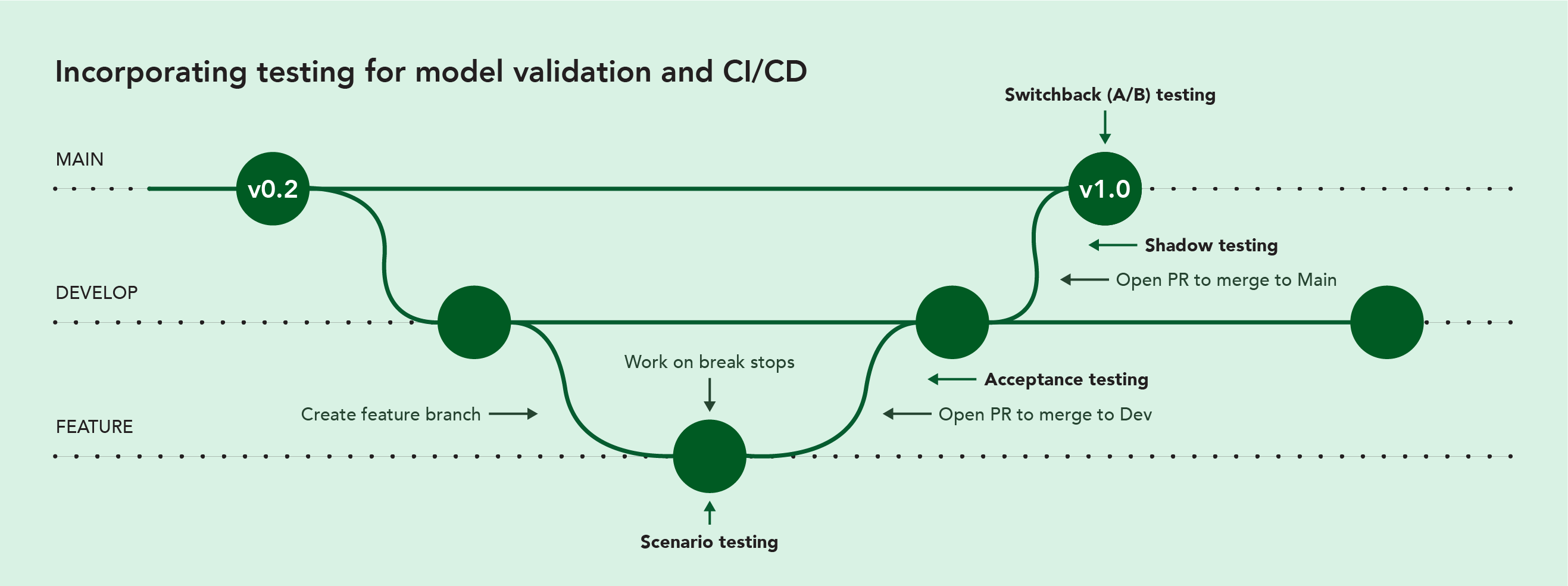
There was a time in a previous role when the routing model I managed hit scaling limits in a big city on a Friday night and stopped making decisions. Scenario testing would have allowed me to better prepare for this. Running a model in shadow mode would have given me a feasible backup to keep the lights on while we figured things out. Git-based flows make robust testing more effective. And, as mentioned earlier, they can be built into automated workflows as part of your CI/CD (with GitHub Actions, GitLab CI/CD or Bitbucket Pipelines).
Collaborate more effectively, get buy-in more effectively. Git-based flows get more people involved – but not in a too-many-cooks sort of way. There’s a reason Git took off: It made collaborating on code easier. This is especially true with the modeler-engineer interface: If engineers can run your model locally and know how to integrate it, you can get more projects live.
When you can develop, test, review and merge software more easily, you can integrate it into your systems faster. And when you integrate faster, you get more projects making optimized real-world decisions, which can help your company save money and generate revenue.
Avoid single points of failure. I’ll keep this brief: Single points of failure are not a good thing. We are well past the days of a model running on someone’s laptop under a desk that then breaks while said someone is vacationing on a remote island with no internet for three weeks. Git-based flows put your code in an accessible, transparent space that is good for company resilience and model resilience.
Don’t get pigeonholed into one type of problem. I’ve come across modelers who have been (or worry about being) categorized as one-trick optimizers: They only do routing or only do scheduling. But as we know, if you have a routing problem, you have a scheduling problem and a fulfillment problem … and an incentive allocation problem. (All good problems to have, by the way.) And each of them are problems to which more companies should be regularly applying the practice of DS/OR. But when decision models are perceived as curious black-box entities, it’s harder to muster the enthusiasm to expand a modeler’s purview to more and curiouser black-box entities.
But with Git-based paradigms, we say: Mystery and hesitation, be gone! Your work fits better into engineering workflows because it’s more transparent and understandable – a repo, in a way, is like a library showing all your work, edits, checks and updates. This, in turn, builds trust in your ability to efficiently create and deploy more models. And all because you learned enough to be dangerous in a Git-based world.
Git-ting to remote execution faster. We’ve established that Git-based flows make collaborating on model code easier. Here’s another flower to add to that bouquet of reasons: Git helps get your model to remote execution environments faster.
Git is like a stargate for your model. In the same way that Git readily opens up pathways for modelers and engineers to understand and work with model code, it also makes your model more available for other machines to run. Why is this important? Just look at what’s happening with AI and large language models (LLMs). (We couldn’t escape this article without at least one mention of these!) Running locally isn’t an option – there just isn’t enough power. And graphic processing units (GPUs) are overtaking central processing units (CPUs) in this space.
It’s likely we’ll see a similar trend with DS/OR. Yes, running locally has a purpose. Running remotely, however, not only helps bridge the expectation gap between, “Well, it worked on my machine” and “Hey! It works for all of us,” but it may be the only option as optimization models and solvers advance.
Go Forth and Git Flow
Your decision model has value. Your decision model adds value. Your decision model is not simply research and development cost. These statements are only true when your model is in production and making decisions. Git-based workflows make getting to that point easier, more efficient and more repeatable.
You now have some starting inspiration for diving into a new or more excellent Git flow. What’s next? Create new decision models or contribute to existing projects in Git-based solutions (e.g., GitHub, GitLab and Bitbucket), which all provide extensive learning materials. Next, talk with your engineering peers about their Git-based tooling and workflows, including CI/CD. With any luck, you may find yourself saying, “This meeting could have been a pull request.” To which I say, bravo!
References
- Jeffrey Camm and Michael Watson, 2023, “Distinguishing the Profession of Operations Research in the Age of Analytics, Big Data, Data Science and AI,” OR/MS Today, December 12, https://doi.org/10.1287/orms.2023.04.06.
- https://www.atlassian.com/git/tutorials/what-is-git
- https://education.github.com/git-cheat-sheet-education.pdf
- https://about.gitlab.com/images/press/git-cheat-sheet.pdf
- https://www.atlassian.com/git/tutorials/atlassian-git-cheatsheet
- Sebastián Quintero, 2024, “The sushi is ready. How do I deliver it? A look at behind-the-scenes logistics,” Explainer, Nextmv, August 15, https://www.nextmv.io/blog/the-sushi-is-ready-how-do-i-deliver-it-a-look-at-the-behind-the-scenes-logistics.
Ryan O’Neil is CTO and cofounder of Nextmv, a decision science platform that accelerates optimization model teams with DecisionOps tools, modeling and solver integrations, and a model marketplace. Before Nextmv, he led Decision Engineering at Grubhub and Zoomer for forecasting, scheduling, routing and simulation. Ryan earned a Ph.D. in operations research at George Mason University.