Spreadsheet Simulation of Priority Queues
Abstract
This paper develops a spreadsheet simulation methodology for teaching simulation and performance analysis of priority queues with multiple servers, without resorting to macros, add-ins, or array formula. The approach is made possible by a “single overtaking” simplifying assumption under which any lower-priority customer may be passed in line by at most one higher-priority customer. By increasing the number of overtaking customers, one at a time, the simulation model is extended to the “multiovertaking” case. These simplifying assumptions make such spreadsheet simulations (of more complex queuing networks) accessible to students, and so the paper includes teaching and learning strategies for the classroom. Performance analysis of single-overtaking versus multiovertaking polices is included.
Supplemental Material: The online data is available at https://doi.org/10.1287/ited.2022.0037.
1. Introduction
Spreadsheet is a user-friendly yet powerful tool for learning about service systems with queues. Grossman (1999) provided many good end-user modeling exercises to aid students in learning about queues. Doing them as spreadsheet simulations presents queue activities intuitively and clearly (e.g., graphical representation in Ingolfsson and Grossman 2002). Leong (2007b) simplified the queuing spreadsheet simulation model to permit a single template to accommodate a parametrically adjustable number of servers instead of having one spreadsheet each for a fixed number of servers.
Students in business modeling courses can learn about queuing behavior, using actual, resampled, or random-generated data. Generation of random variates is easily done using standard exponential formulas to give Poisson arrival times and exponential service durations (Leong and Lee 2008). These models can be applied to various situations, such as balking and reneging. However, there have yet to be any known attempts to examine priority queuing, for single-server and fixed number of servers cases. In priority queues, customers are differentiated by priority level. On arrival, higher-priority customers are served as soon as a server becomes available, jumping ahead of lower-priority customers already in the queue.
Our literature review showed that priority queues had been studied extensively by various researchers in the past. These papers were, however, too mathematical, and the simulations they and others use had high-level programming languages, all beyond the reach of average business school undergraduate students. There need to be more records of published teaching examples found using spreadsheets for priority queues. In 2010, a web discussion thread sought a simulation spreadsheet of queuing systems with priorities in the Excel Forum. No one offered a satisfactory solution.
As a response, we attempted to construct one of our own. The construction using a spreadsheet proved highly challenging. Finally, with the spark of inspiration, we devised the idea to limit the number of overtaking. Only then could we develop a feasible, crude model with many columns. In the effort to simplify this spreadsheet model, we discovered the possibility of not restricting the single-overtaking assumption, albeit for a fixed maximum number of overtaking.
This study was motivated by the popularity of priority queues in real-world applications, such as airline check-ins, hospital accident and emergency departments, service call centers and customer technical support, and supermarket checkouts. With priority queues being so pervasive in everyday life, our contribution to developing spreadsheet priority queue models should be of great interest to nontechnical practitioners and students in business and social science disciplines. In this paper, we focus on the performance of priority queues in terms of queuing time, waiting time, and queue length on the customers based on their priority level.
This paper presents an unprecedented extension of multiserver spreadsheet simulation to two-level priority queues without resorting to macros, add-ins, or array formulas. Furthermore, the model makes it easier for less technically inclined students to explore possible adaptive changes while interacting with business managers. This work continues from those done by Leong (2007a, b) and Leong and Lee (2008, 2020) to provide more straightforward approaches to present complex operational concepts using spreadsheets to make the teaching of these topics possible to undergraduates in business and social science disciplines.
The novel approach made an initial simplifying, single-overtaking assumption, under which lower priority customers could be overtaken in servicing orders at most once by higher-priority customers who arrive after them. Single-overtaking belief helped to resolve what appeared to be an intractable problem. By increasing the number of overtaking, one at a time, the model was further extended for (fixed) multiovertaking.
The paper is organized as follows: The next section recaps the rationale for spreadsheet modeling and outlines the pedagogical approach adopted; Section 3 introduces the base queuing spreadsheet simulation model, as the starting framework for proposing priority queuing with single-overtaking in Section 4; Sections 5 and 6 extend this to multiserver and multiovertaking, respectively; Section 7 shows results of preliminary analyses (not intended to replace a more thorough analysis, best done in a research paper); and finally, Sections 8 and 9 round off the paper with a broad discussion and conclusions.
2. Pedagogy
The preference for using spreadsheets for the nontechnical learning community is well discussed by Leong and Cheong (2008, 2015). This approach, which is implemented in the revamped “Computer as an Analysis Tool” undergraduate course at the Singapore Management University, has been highly successful. For decades, the course was made mandatory for practically all students there, and is branded as one of the most intellectually challenging courses. Yet, the course continues to receive excellent student reviews yearly. Because of its popularity, the university deployed dozens of instructors to teach the course throughout the year. In addition, a version of this course was taught to master degree students in various programs. Later, another variant of the course was offered to undergraduates at the Singapore University of Social Sciences, with a similar impact.
Although Visual Basic for Applications (VBA) was demonstrated in that course, its use was not encouraged when direct spreadsheet features and functions are available. It lets students perform what appears to be arithmetic-like computations with cell references as variables, in contrast to programs using computer languages or software application packages that are more like black boxes; spreadsheet models are transparent and easier to manipulate by end users. Consequently, it brings technical analysis more accessible to business and social science students. The philosophy adopted is one of exploratory modeling and experiential learning.
Teaching a course with spreadsheets is not specifically about helping students learn spreadsheets but rather to help them grow to make better decisions as executives and managers in the real world. Naturally, with more exposure to spreadsheets, students become more confident in analytical work.
In our university’s various business undergraduate programs, simulation modeling of queues is taught in different courses: business skills and management, quantitative methods, and operations management. However, the less intuitive approach to teaching queuing processes is to provide mathematical formulas for average waiting times and other performance measures according to the arrival time distribution, service duration distribution, number of servers, queue discipline, or code queuing simulations in VBA (as in Albright (2001) and Winston and Albright (2019)).
With our academic programs targeted at less technically oriented students, we generally adopt simulation using spreadsheets but are constrained by the limited variety of queue simulation spreadsheet workbooks available. With the proposed simulation model in this paper, students can learn another exciting aspect of queues, particularly in the queuing discipline.
The goal of a class exercise using the PriorityQueues.xlsx workbook that accompanies this paper is to familiarize students with queuing as a process and the implications of introducing differentiated service priorities. In practice, they get to develop in spreadsheets the foundational part of the simulation model. The intent in doing this almost from scratch is to let them learn the first principles on their own. They do this in the development process as well as on the completed model by asking what-if questions, to get better insights into queuing system dynamics.
The PriorityQueue.xlsx workbook contains 10 worksheets: Home, Scratch, Explain, Data, Proto, Testcases, 1-Server, c-Server, c-Server(2), and Results. The Home worksheet contains introductory information and a legend that explains the common “look-and-feel” guide of Leong and Cheong (2015) for workbooks used in many courses using their workbooks. Typically, in our classes, students are taught to use the Scratch worksheet (a blank worksheet) to start placing basic information and laying out the table headers. The outcome of that exploration should look like the Proto worksheet.
We would jump from the Home worksheet to the Proto worksheet for more complicated topics such as priority queues. The Proto worksheet was used as the template for the instructor to lead students in constructing the required model. In our case, this would be a 1-Server worksheet, further extending to that of the c-Server and c-Server(2) worksheets. Students would be guided interactively to develop the cell formulas for customer 1, altering the cell referencing (to absolute, relative, or mixed form as needed) so that customer 1’s row can be copied and pasted down to complete the model.
Worksheets containing the completed models are for instructors’ and students’ reference only. Students can compare their work in the Proto sheet against them to see whether they got it correctly. Sporadically, students do come up with better approaches worthy of praise. During the model construction, the instructor would need to refer to the Explain worksheet, the content of which is shown in Figure 2: it explains the derivation of the formula for computing the average number of customers in the system. This is not the central focus of the construction and hence is left as an interesting aside to explore.
3. Single-Server Base Model
We now begin constructing the single-server queue simulation model using the Proto worksheet. Leong (2007b) devised the generic spreadsheet template for this. We added a new column to indicate each arriving customer’s priority level (Figure 1, column C from cell 14 onward). In the worksheet, customers are listed in ascending order of their arrival time. Effort must be spent to alter the processing order of customers to give preference to priority 1 customers where possible. This is done by altering the formula for service-start time, which will be elaborated on later in this section. We must first orient the student with the queuing simulation template, common to all three “server” workbooks.

In Figure 1, row 15 holds the time durations and events related to customer 1, row 16 for customer 2, and so on. In each row, from row 15 onward, the simulation elements are as follows:
Column B indicates the customer’s order of arrival
Column C has the priority level
Column D has the interarrival time (defined as the time interval between the arrival time of this customer and that of the immediate-preceding customer)
Column E has the time duration required to service this customer
Column F has the arrival time (computed from the immediate-preceding customer’s arrival time plus this customer’s interarrival time)
Column G has the service start time
Column H has the service end time (which is equal to service-start time plus service duration)
Column I has the wait time (computed by subtracting arrival time from the service start time)
Column J has the system time (which is the time the customer spends in the system from arrival to the end of service) and
Column K has the system length (defined as the number of customers in service and queue just before each customer arrives)
For cells above row 15, input cells C14 and H14 are for priority level and service end time of hypothetical customer 0, respectively. The priority of customer 0 is always set to the lowest level. The system being studied is assumed to open at this time and the arrival time of customer 1 is obtained by adding this to the first interarrival time.
Statistical outputs of the simulation are as follows:
Cell D8 computes the traffic intensity (defined as the ratio of the average customer arrival rate to the average service rate)
Cell E8 calculates the utilization for this simulation run (by dividing the sum of performed service durations by total available server time)
Cell F8 gives the value for the last customer’s arrival time
Cell H8 provides the value for the last customer’s service-end (or departure) time needed for computing server utilization
Cells H6 and H7 give the last priority 1 and priority two customers’ service end times. The remaining cells in rows 6 to 8 compute average statistics for their respective columns.
We could directly use observed data for evaluated customers in our model (refer to the Data worksheet). Or simulate arrival interarrival-time and service duration by resampling from raw datasets using = PERCENTILE(data_array, RAND()) formulas (Leong and Lee 2008) if the datasets are statistically independent. Otherwise, students could combine RAND, MATCH, and INDEX functions (Leong 2007a). Alternatively, one can assume independence, exponential interarrival time, and service duration distributions, and use LN, the appropriate inverse function.
Cells D4 and E4 hold the averages of two raw data sets, one for interarrival times and the other for service durations, respectively. In the simulation, the priority level of customer 1 (cell C15) is given by
Assuming that the priority level is taken from {1,2}, this formula generates priority 1 customers randomly in the proportion given in input cell C4. To get the no priority case, just set the ratio of priority 1 customers in cell C4 to zero.
For customer 1, Poisson interarrival time (cell D15) using the inverse function method is simulated by
The simulated arrival time for customer 1 is thus given by
The previous formulas for customer 1 could be copied and pasted to the remaining rows for remaining customers. This applies to remaining columns to the right as well. Using conditional formatting, priority 1 customers’ rows are highlighted to make them more visible. We developed a template for the first 100 customers. Students are encouraged to include more customers to reach a steady state. To expand beyond 100, insert rows above the last row (R114). After that, copy the formulas for customer 1 and paste them down to the other rows. This way, all the formulas giving the statistical results in rows 6 to 8 remain valid.
For the single-server case with no priority queuing, the service-start time of any customer could be computed by taking the larger arrival time of the customer and the service-end time of the immediate-preceding customer. Therefore, the service-start time for customer 1 (cell G15) is given by
This service-start formula, the critical difference in the various spreadsheet queue simulation models, will be modified for priority queues in the next section.
For completeness, service end time as explained earlier is logically service start plus service duration, and wait time is the difference between service-start and arrival times. System time is the sum of service and wait times, and system length is the number of people in service and queue.
System length is found by counting the number of customers, from among those who had arrived earlier, whose service end times are larger than the customer’s arrival time. Therefore, just before the arrival of customer 1, the system length (cell L15) is computed by
The COUNTIF(range, criteria) function counts the number of cells that meet the specified criteria in the given range. The previous formulation’s criterion is “greater than the arrival time of the referenced customer.” (See Appendix A for an explanation of COUNTIF and the concatenation operator &.)
Without further deliberation, the optional computations of the more complicated weighted average of the number of people in service and queue in each interarrival interval are explained in Figure 2.

4. Single-Server Priority Queue
We now examine priority {1,2}, single-server queuing with nonpreemptive, single-overtaking. The simplifying assumptions are defined as follows: priority 2 customers’ service, once started would not be disrupted, and priority 2 customers could only be overtaken in the first-come, first-serve (FCFS) sequence by at most one (higher-priority) customer.
The algorithm evaluates one customer at a time, from the first arriving customer to the last:
Set the service-available time of the customer being evaluated (CE) to equal the largest service-end times of all customers preceding CE in arrival.
If CE is a priority 2 customer, examine the arrival times of all priority 1 customer who arrive after CE:
○ Define an overtaking candidate (OD) as any later-arriving priority 1 customer with service start time not assigned, noting that there may be more than one ODs.
○ Define overtaking customer (OC) as the one with the smallest arrival times among the ODs, if there are any.
If the arrival time of OC is less than or equal to the service-available time of CE:
○ Set the service-start time of OC to be equal to the service-available time of CE.
○ Set the service-start time of CE to be equal to the service-start time plus the service duration of OC.
If the service-start time of CE has not been given, set the service start time for CE to equal the larger CE arrival time and service available of CE. Both priority 1 and priority 2 customers follow the same logic.
Priority 2 customers who arrive between a priority 2 CE and its overtaking OC had also been overtaken by OC. In the proposed single-overtaking simplification, these priority 2 customers would not be allowed to be overtaken again by another priority 1 customer. The service start time of these priority 2 customers would just be equal to the larger of their arrival time and service available time. (See Appendix B for the mathematical formulation of the algorithm.)
Wait time performance for priority 1 customer would be better under priority queuing versus no priority queuing; conversely, wait time performance for priority 2 customers would be worse under priority queuing versus no priority queuing. This single-overtaking proposal limits the degradation of priority 2 customers’ service performance, which could be excessive when both server utilization and the proportion of priority 1 customers are high. The solution thus provides an upper bound on the wait time performance for priority 1 customers and a lower bound on the wait time performance for priority 2 customers in priority queuing compared with unrestricted overtaking.
The proportion of priority 1 customers should typically be low (less than or equal to 20%) because having a high priority level is pointless if it is awarded too liberally. When the proportion of priority 1 customers is low, the simulation proposed should give practically the same performance outcome as unrestricted overtaking.
When server utilization is low, there is a slight advantage in having priority queuing to improve service performance for priority 1 customers because they would be served immediately on arrival. Thus, priority queuing is only interesting when overall server utilization is relatively high, with a persistent present of queues.
The previous algorithm is implemented into the base single-server spreadsheet, keeping the model in Figure 1 essentially unchanged by setting up the priority queue computations in a separate table, as shown in Figure 3. Recursive computations are involved. Thus, the Spreadsheet’s “Use iterative calculation” option must first be selected, and there, change the maximum change (i.e., the tolerance error) parameter value to 0.0001.

The service start time (cell G15) in the main table, the sole link between the two tables, would be modified to
As the FCFS order would be violated in priority queues, the service available time for each customer is no longer the service end time of the immediate preceding customer. It is now the largest of the service end times of all preceding customers. Hence, service available time (cell O15) is given by
Consequently, the initial service start time (cell P15) for no priority queuing is given by
As the closest priority 1 customer to arrive after customer 1, the sole OD’s arrival time (cell R15) is given by
The MINIFS(range, criteria_range, criteria1, [criteria_range2, criteria1],…) formula returns the minimum value of the specified range that satisfies the conditions provided. IFERROR and IF(MINIFS set OD’s “arrival time” to infinity (i.e., 999.9999) terms cover the cases where there are no overtaking candidates.
When OD arrives before the service available time of CE, OD could overtake the priority 2 customer’s position in the queue. The customer index of OD (cell S15) is given by
Where there are more than one priority 2 customers who could be overtaken in the queue by the same OD, the overtaking would be by the earliest arrival among those who could be overtaken. The other remaining possible overtaken customers need to be removed. Column T shows the index number of the immediate preceding priority 1 customer who could surpass each priority 2 customer. This customer index of OD (cell T15) would be set to blank if it had appeared for a preceding customer:
The overtaken priority 2 customer’s service available time (cell O15) is OC’s service start time (cell U15):
Searching column E of service durations in the main table, service end time of OC (cell V15) is found:
Finally, priority queue service start time (cell Q15) is given by
For priority 1 customers, the INDEX function slots the service start time of OC in column U to its relevant customer row given by MATCH function, and for priority 2 customers, service start time is the service end time of OC (cell V15) if it was overtaken. Otherwise, it is the larger of its arrival time and service available time (cell P15).
5. Multiserver Extension
The priority {1,2}, single-server, single-overtaking base model is modified for the multiserver priority, priority {1,2}, single-overtaking model. It is done in the same spirit as in Leong (2007b), using only one template for any c number of servers by replacing “maximum service-end time of customers who arrive before” with “cth largest service-end time of the customers who arrive before.” That is, in Excel, substitute MAX(…) by LARGE(…, c) in Equation (8).
For the multiserver, the service-available time of customer 1 (cell O15) is revised to
There is one more minor change in the main table: Server utilization for this simulation run (cell E8) is now given by dividing the sum of performed service durations by total available server time, dividing again by the number of servers. Only one new input cell and two formulas are needed to convert the single-server priority queue simulation model to a multiserver one.
6. Multiovertaking Extension
We now relax the simplifying assumption that priority 2 customers arriving between the CE and its overtaking OC were not allowed to be overtaken by another priority 1 customer. Multiovertaking takes place when the arrival time of the priority 1 customer next-to-arrive after OC (i.e., OC2) is less than or equal to the service available time of one or more of the priority as mentioned earlier 2 customers. Similarly, these priority 2 customers may be overtaken by OC3, OC4, … that comes after. It is, however, likely that multiovertaking is less frequent than imagined because the many interleaving priority 2 customers would make the arrival time of priority 1 customer reasonably spaced out. Therefore, the single-overtaking assumption may generally suffice.
To address multiovertaking, the earlier algorithm needs to be revised to consider the closest next-to-arrive priority 1 customer who had yet to be assigned a service start time rather than only the next-to-arrive priority 1 customer (see Appendix B). For this, we now revisit the second table in the single-overtaking spreadsheet models and amend them for this purpose (Figure 4).

The arrival time of the closest priority 1 customer to arrive after CE (cell R15) was computed using the MINIFS function in Equation (10). For multiovertaking, we need a SMALLIFS function to find the first, second, and other closest priority 1 customer to arrive after CE. As such a function does not yet exists, an array formula that emulates it was devised (cell R15):
Cells V10:Y10 hold integers 1, 2, 3, and 4 for orders of overtaking. The highest order of overtaking (m) is set at four. This was found to be more than adequate, as the incidents of reaching that order of overtaking is extremely small. An array formula, as evidenced by the {} uses three concurrent (Shift + Ctrl + Enter) keys in an entry. The (($C16:$C$114 = 1)*($F16:$F$114 <= $O15) term combines the required criteria into a single logical condition. The formula in cell R15 is copied over to columns S to U for the second, third, and fourth overtaking candidates. This extension to multiovertaking makes the model more complicated.
Alternatively, we could continue to use Equation (10) for cell R15 but introduce a new condition that the arrival time for OD2 must be larger than OD1’s into it in cell S15:
The formula in cell S15 is copied over to columns T and U for the third and fourth overtaking candidates. Even more overtaking candidates could be similarly addressed if needed. When sufficient columns are added for the ODs, the queue model becomes unrestricted in overtaking. The additional number of columns should be small.
The customer index of overtaking candidate 1 (Cell V15) is given by
Again, columns W to Y are replicated from column V for overtaking candidates 2, 3, and 4. Correspondingly, more overtaking candidate columns could be added if needed.
Expanding on the concept used before in the single-overtaking model to find OC’s customer index (cell Z15), except now among a few ODs, we apply nested IF functions of MATCH functions, one IF for each overtaking candidate:
The last two columns in the second table of the worksheet remain the same in principle as those in the single-overtaking model, except for changes in the location of their referenced cells. Hence, service start time of OC (cell AA15), service end time of OC (AB15), and multiovertaking service-start are given, respectively, here:
7. Preliminary Analysis
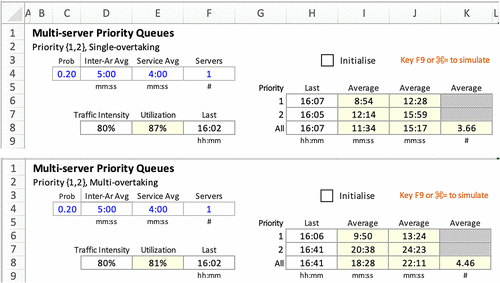
The statistical results of one test case are shown in Figure 5. For fairness of comparison, the number of servers in the two multiserver models are set to one for the data set used in Figure 1 for the single-server case. The multiovertaking model did slightly better than the single-overtaking model, trimming off trivially less than 20 seconds of 5–10 minutes of average wait time. Also (not shown), increasing the order of overtaking did not increase the number of overtaking.
The authors conducted a more in-depth evaluation. This time on a total of 6,000 test cases, with priority 1 proportion of priority 1 customers p ∈ {0.0, 0.1, 0.2}, number of servers n ∈ {1, 2, 3, 4, 5}, and server utilization u∈ {60%, 70%, 80%, 90%}, with 100 replications for each set of parameter values. Multiple-overtaking order (m) is still at four.
Caveat emptor: As this is a pedagogical paper, with no pretense to be an analytical research study report, these evaluations described previously, although more rigorous, are merely for collecting indicative results for classroom discussion. Admittedly, they may not be sufficiently conclusive as analytical research. They serve to interest students to study priority queuing further as term projects.
To automate the collection of simulation results, Excel spreadsheet VBA macros in another workbook (Appendix C) are used. The collected results are collated in yet another workbook for further analysis. These two workbooks do not need to be shown to the class; only tables and charts arising from them are brought up for discussion (as shown in Figures 6–8, D.1–D.3, E.1, and E.2). In interpreting the results, we need to remember that each replication terminated when the 100 prespecified number of customers completed service, as opposed to having a closing time for new arrivals and meeting remaining customers in the queue. The wait medians of 100 replications are analyzed. This is used instead of the usual mean because there are sporadic tendencies for infinite queue lines and excessive waits in high-utilization queue systems.

Notes. (a) Wait median for all customers. (b) Wait median for all customers.
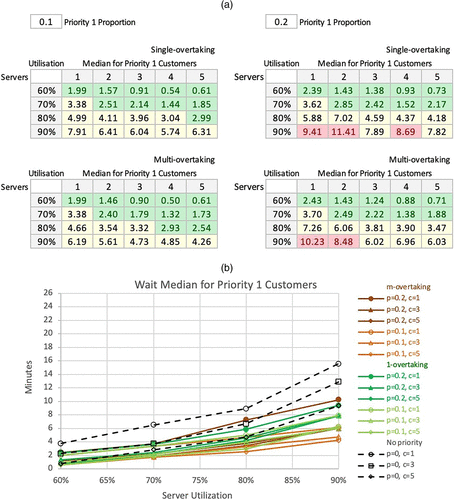
Notes. (a) Wait median for priority 1 customers. (b) Wait median for priority 1 customers.

Notes. (a) Wait median for priority 2 customers. (b) Wait median for priority 2 customers.
Conditional formatting thresholds for medians: green = less than 3; red = equal or more than 8.
In the preliminary analyses, we examine wait medians for all customers (in the tables of Figure 6(a) and a chart of these tables in Figure 6(b)) and for priority 1 and priority 2 customers (in tables and charts in Figures 7 and 8). The following observations comparing no priority queuing against that of single-overtaking and m-overtaking can be made:
Across all three scenarios, the wait median for all customers increases with an increase in server utilization, an increase in the proportion of priority 1 customers, and a decrease in the number of servers.
○ Higher server utilization is expected to adversely affect service performance because the more congested the system, the longer the wait.
○ Overtaking takes place more when server utilization is higher, and the proportion of priority 1 is higher. The overall wait time performance degrades more under those circumstances.
○ Increasing the number of servers reduces waiting for the exact server utilization because servers become available more often with more servers. Thus, the lower-priority customers would get more chances of getting their service started before a high-priority customer overtakes them in the queue.
No priority queuing has lower wait medians than 1-overtaking; 1-overtaking has lower wait medians than m-overtaking, for m > 1.
○ The key principle learned is that queuing systems with priority-differentiated service is expected to perform worse in wait performance than systems without.
○ The tradeoff is that we are allowing a small proportion of (higher-priority) customers to get better service at the expense of the others, but this turns out to be disproportionately so that, on the whole, the queuing system is worse off in wait time.
○ Wait time performance under multiovertaking seems to be minimally worse than that under single-overtaking when server utilization is less than 70%.
○ This is likely because limiting the permitted number of overtaking moderates the extent of the favoring priority 1 customer affects the whole.
○ This implies that, when service preference to priority 1 customer is more restricted, the negative overall impact of priority queuing is more mitigated.
○ With low server utilization, there are few opportunities to overtake because all customers are more likely to be served on arrival.
8. Discussion
The spreadsheet implementation of the procedural algorithm is characteristically object oriented, with each cell as an object. Hence, the simulation model is highly interactive and easily modified in the presence of students in a class for various “what-ifs” experimentations. For example, the average service duration for two priority levels may differ. One possibility is that priority 1 customers need more extended service because of the attention accorded them as premium customers. They may also be shorter because higher priority was assigned to customers that require less servicing work to emulate the “shortest processing time first” optimal policy in production scheduling.
If the priority levels are assigned to customers on arrival after preassessment of their servicing requirement (as in a triage station in a hospital accident and emergency department), then priority level for customer 1 (cell C15) is given by
Conversely, if the average service durations for the two predesigned priority levels are known to be different, the service duration of customer 1 (cell E15) is simulated by
The most direct approach is to teach the construction of the basic single-server spreadsheet simulation model first and build on that to cover multiservers (Leong 2007b). Along the way, instructors could use the models to ask questions on the effect of arrival and service behavior, traffic intensity, and the number of servers. Then, we could explore priority queues for single-overtaking and then later to multiovertaking.
If time permits and students are up to it, the instructor could guide students in the class to construct the overtaking table in the worksheets. Otherwise, the instructors can lead the students through the model’s completed overtaking table and learn what each formula does. After which, we can ask questions on the effect of proportions of priority 1 customers on overall and stress levels’ service performances under different server utilization. Incidentally, setting the ratio of priority 1 customers to zero gives the no-priority case.
The 1-Server; c-Server; and c-Server(2) worksheets contain completed simulation priority {1,2}, queue simulation models for single-server, single-overtaking; multiserver, single-overtaking; and multiserver, multiovertaking cases, respectively. These three “Server” worksheets are for the instructor and students’ reference. When there is insufficient time to construct all the cells in detail, the instructor could jump to these models and use them for what-if analyses. In particular, the second page of the c-Server(2) worksheet (for multiovertaking) is substantially expanded from that of the c-Server worksheet (for single-overtaking). We do not recommend constructing c-Server(2) but to explain how single-overtaking could be extended to multiovertaking and compare the results.
In the comparative simulation evaluations, input data in cells C15:E114 of the Server worksheets are simulated static values copied from the Testcases worksheet. The simulation experimentation “Simulate” macro is in a workbook called PriorityQueues_Test.xlsm. This macro would refresh the input data according to the specified test cases listed in the “Results” worksheet, and collate the results back into that worksheet. To keep the PriorityQueues.xlsx workbook’s size small and its purpose focused on the construction of the model, the outputs of “Results” worksheet after each run of the “Simulate” macro are copied to another workbook called PriorityQueues_Analysis.xlsx. In that workbook, outputs of the various simulation runs are statistically summarized into tables and charts (as shown in Figures 6–8, D.1 and D.2).
The macros used would not be needed if Excel’s data table feature can handle nx inputs and ny outputs for nx > 2 and ny > 1. These macros in another spreadsheet workbook simply automates the collation of data for different parameter values and multiple replications. They do not play any part in the priority queuing simulation.
The priority queuing workbook (PriorityQueues.xlsx) have been subdivided into three workbooks: SimplerSingleServerPriorityQueues.xlsx, SimplerMultiServerPriorityQueues.xlsx, and MultiServerPriorityQueues.xlsx. The first two workbooks cover the single-overtaking situation, whereas the last workbook evaluates multiovertaking. According to their course curriculum, instructors could decide which one or more of the four workbooks to use for their class. All four workbooks are available from the authors upon request.
The initial reason for making the single-overtaking simplifying assumption was to make it possible to do priority queuing simulation, which had to seem very intractable. Only after the single-overtaking spreadsheet was done did we realize that it can be extended to multiovertaking with further refinement. However, even with multiovertaking, the simulation is limited by a prespecified maximum number of overtaking; it is still not priority queuing in its complete form.
The single-overtaking spreadsheet model was retained as it remains valid for two reasons: (1) stepping stone for building up the m-overtaking model and (2) valid priority queuing policy to implement, which moderates the negative impact on priority 2 and overall wait time performance. The m-overtaking model is a stepping stone because it only becomes (regular) priority queuing when m is infinity, although a small m of four was found to be sufficiently large. Pedagogically, it also makes sense to teach students how to construct the single-overtaking case step by step and, for the sake of time, show the completed multiovertaking worksheet to explain that it may be so extended (without leading students in the detailed construction).
Moreover, as shown by our simulation results, a slight advantage is gained beyond single-overtaking. It is not only a simplifying step to construct the simulation spreadsheet but a helpful policy in practice. In high server utilization situations, where priority queuing is more meaningful, single-overtaking’s priority 2 customers’ and overall wait time performance are less degraded than in multiovertaking.
Spreadsheets may not be the best approach to present priority queuing to students, and programming languages such as VBA may be more suited. We choose to differ. From our decades of experience in this, we found that it is tough enough for students to learn spreadsheets, and they do not need to be burdened with more time and effort to learn a computer language that they would not regularly use in school or later.
Conversely, spreadsheets are ubiquitous in the classroom and modern office. Therefore, the motivation to learn spreadsheets and use them directly in analysis (rather than through intermediary algebraic steps) is much welcomed. Moreover, by building the spreadsheet simulation model, students can see the blow-by-blow outcomes for each simulated customer is important, as nobody wants to trust a black box.
Moreover, codes in VBA (or any programming language) and software packages are black boxes to the users, whereas spreadsheets are more transparent and amicable to programmers and nonprogrammers alike. Although using VBA might be easy for technically inclined students, its codes are still hard to exploit, for example, for discovering simplifying robust priority queuing policies. Moreover, it is management generalists, not technical analysts, who give final approval in decision making. Hence, the drill-down visibility that spreadsheet models provide is invaluable.
9. Conclusion
The single-server and multiserver queue simulation models could be easily improved for single-overtaking queues with two priority levels, without the need for add-ins, macros, or array formulas. This makes possible for the first time (as far as we know) the introduction of priority queuing simulation using the ubiquitous spreadsheets in the business school classrooms to deepen students’ learning. Extension to multiovertaking is equally easy, though for undergraduates, we recommend teaching only single-overtaking models since they are simpler to understand and have practical implementation advantages in service operations.
Here are some findings from this study and preliminary simulation analysis that needed further studies to confirm:
Single-overtaking in priority queuing may not have been previously studied as a concept. A more thorough literature review (beyond the scope of this paper) is needed for this.
Single-overtaking provides a tight upper bound on priority 1 customers’ expected wait time.
Priority 1 customers’ wait median under m-overtaking is an upper bound to that under m′-overtaking for any integer m < m′, m′ = 2 to ∞. By definition, relaxing the order of overtaking to when m equals infinity yields (regular) priority queuing. In practice, we only need to increase m large enough value beyond which it does not impact wait-time performance for priority 1 customer. It seems m = 4 is more than sufficient.
Increasing the order of overtaking m increases priority 2 customers’ wait median disproportionately, so much so that the overall wait median is increased.
Extending the model for more than two levels of priority is plausible. However, the authors should have pursued this study, as the computations are expected to be similar, requiring array formulas and far more tedious, adding little pedagogical value. We suggest leaving this aspect as possible class project assignments for advanced students.
Appendix A.
A.1. CONCATENATION
To concatenate is to combine end-to-end two strings of text. The operator provided in Excel for this purpose is and. Therefore, “ABC” and “DEF” will yield “ABCDEF.” This can be done to text or cells with values. For example, “>” and E20 yields “>5” when cell E20 contains the value 5. Excel automatically converts the number 5 into text before completing the concatenation.
A.2. COUNTIF
COUNTIF(range, criteria) counts the number of values that satisfies the criteria in the data set specified by the range. The criteria, which is not logical, must be expressed in quotes to denote text, for example,”>5.” Therefore, COUNTIF(A1:A20, “>5”) counts the number of values that are greater than 5 in cells A1 through A20. Now using the and concatenation operator and setting the value in cell E20 to 5, COUNTIF(A1:A20, “>”andE20) becomes equivalent to COUNTIF(A1:A20, “>5”). The advantage of the former is that the value of E20 can be arbitrarily changed to other values to suit our purpose.
A.3. LARGE and SMALL
LARGE(range, k) returns the kth largest value in the data set specified by the range. For example, LARGE(A1:A20, 1) returns the largest value in the data set contained in cells A1 through A20 (same result as MAX(A1:A20)), LARGE(A1:A20, 2) returns the second largest value, LARGE(A1:A20, 3) returns the third largest value, and so on. When used against a column with running serial numbers 1, 2, 3, ., it can be used to sort a set of numbers in descending order. Similarly, SMALL (range, k) returns the kth smallest value in the data set specified by the range.
A.4. MINIFS and SMALLIFS
MINIFS(range, criteria_range, criteria1, [criteria_range2, criteria1],…) returns the smallest value that satisfies the multiple criteria in the data set specified by the range. Excel does not have a SMALLIFS(range, criteria_range, criteria1, [criteria_range2, criteria1],…, k) function to find the kth smallest value that satisfies the multiple criteria in the data set specified by the range. This functionality can be achieved using Array functions as follows:
Appendix B.
B.1. Priority {1,2}, Single-Server, Single-Overtaking
B.1.1. Variables.
i = Customer index, in ascending order of arrival time.
For customer i = 1, …, n (total number of customers),
|

| Pi = Priority level; Ai = Arrival time; Si = Service duration; | (Key inputs) |
| SAi = Service-available time; | (New) |
| ASi = Service-start time assignment indicator; | (New) |
| SSi = Service-start time; | |
| SEi = Service-end time, with SEi = SSi + Si |
|
| P0 = 2 | Line 1 |
| ASj = 0 for j = 1, …, n; SE0 = 0 | Line 2 |
| For i = 1 to n | Line 3 |
| SAi = Max {SEj for j = 0, …, i-1} | Line 4 |
| If {Aj | Aj ≤ SAi; Pi = 2; Pj = 1; ASj = 0 for j = i-1, …, n} = ∅ Then | Line 5 |
| u = Arg Min {Aj | Aj ≤ SAi; Pi = 2; Pj = 1; ASj = 0 for j = i-1, …, n} | Line 6 |
| SSu = SAi; ASu = 1 | Line 7 |
| SAi = SSu + Su | Line 8 |
| EndIf | Line 9 |
| IF ASi = 0 Then SSi = MAX {Ai, SAi} Else Next i | Line 10 |
| Next i | Line 11 |
B.2. Priority {1, 2}, Multiserver, Multiovertaking
Algorithm for the single-server, priority {1,2} base model is still valid, except Lines 5, and 9 need to be revised as follows:
|
| While {Aj | Aj ≤ SAi; Pi = 2; Pj = 1; ASj = 0 for j = i-1, …, n} = ∅ Then | Line 5 |
| EndWhile | Line 9 |
B.3. Priority {1, …, m}, Single-Server, Single-Overtaking
Algorithm for the single-server, priority {1,2} base model is still valid, except Lines 1, 6, and 7 need to be revised as follows:
|
| P0 = m | Line 1 |
| If {Aj | Aj ≤ SAi; Pj < Pi; ASj = 0 for j = i-1, …, n} = ∅ Then | Line 5 |
| u = Arg Min {Aj | Min {Pj | Aj ≤ SAi; Pj < Pi; ASj = 0 for j = i-1, …, n}} | Line 6 |
B.4. Priority {1, …, m}, Multiserver, Multiovertaking
Algorithm for the single-server, priority {1,2} base model is still valid, except Lines 1, 6, 7, and 10 need to be revised as follows:
|
| P0 = m | Line 1 |
| While {Aj | Aj ≤ SAi; Pj < Pi; ASj = 0 for j = i-1, …, n} = ∅ | Line 5 |
| u = Arg Min {Aj | Min {Pj | Aj ≤ SAi; Pj < Pi; ASj = 0 for j = i-1, …, n}} | Line 6 |
| EndWhile | Line 9 |
Appendix C. Macros for Collating Simulation Results
Sub Simulate()
Workbooks(“PriorityQueues.xlsx”).Activate
Sheets(“Results”).Select
‘ Clear Old Outputs –––––
n = Range(“B8”).End(xlDown).Value
Range(Range(“H8”), Range(“H8”).End(xlToRight). End(xlDown)).ClearContents
‘ Transfer New Inputs –––––
For i = 1 To n
Sheets(“Results”).Select
Range(“H6”).End(xlDown).Offset(1, -5).Range (“A1:D1”).Copy
Sheets(“Testcases”).Select
Range(“C4”).PasteSpecial Paste:=xlPasteValues
LinkToNewStaticTestCase
Sheets(“Results”).Select
Range(Range(“H7”), Range(“H7”).End(xlToRight)). Copy
Range(“H6”).End(xlDown).Offset(1, 0).Select
Selection.PasteSpecial Paste:=xlPasteValues
Next i
’Tidy Up ––––––––
ReturnToDynamicOriginal
Sheets(“Results”).Select
Application.CutCopyMode = False
Range(“A1”).Select
End Sub
‘––––––––––––––––
Sub LinkToNewStaticTestCase()
Workbooks(“PriorityQueues.xlsx”).Activate
Calculate
‘ c-Server –––––
Sheets(“c-Server”).Select
Sheets(“Testcases”).Range(“C4:F4”).Copy
Range(“C4”).PasteSpecial xlPasteValues
Sheets(“Testcases”).Range(“C15:E114”).Copy
Range(“C15”).PasteSpecial xlPasteValues
Application.CutCopyMode = False
Range(“A1”).Select
‘ c-Server(2) –––––
Sheets(“c-Server(2)”).Select
Sheets(“Testcases”).Range(“C4:F4”).Copy
Range(“C4”).PasteSpecial xlPasteValues
Sheets(“c-Server”).Range(“C15:E114”).Copy
Range(“C15”).PasteSpecial xlPasteValues
Application.CutCopyMode = False
Range(“A1”).Select
‘ Tidy up –––––
Sheets(“Results”).Select
End Sub
‘––––––––––––––––
Sub ReturnToDynamicOriginal()
Workbooks(“PriorityQueues.xlsx”).Activate
Sheets(“Testcases”).Select ‘–––––––
Range(“H4:K4”).Copy
Range(“C4”).PasteSpecial xlPasteValues
Application.CutCopyMode = False
Range(“A1”).Select
Sheets(“1-Server”).Select ‘–––––––
Range(“C15:C114”).Formula = “=IF(RAND()<$C$4,1,2)”
Range(“D15:D114”).Formula = “=-$D$4*LN (1-RAND())”
Range(“E15:E114”).Formula = “=-$E$4*LN (1-RAND())”
Sheets(“Testcases”).Range(“C4:E4”).Copy
Range(“C4”).PasteSpecial xlPasteValues
Application.CutCopyMode = False
Range(“A1”).Select
Sheets(“c-Server”).Select ‘–––––––
Range(“C15:C114”).Formula = “=IF(RAND() <$C$4,1,2)”
Range(“D15:D114”).Formula = “=-$D$4*LN (1-RAND())”
Range(“E15:E114”).Formula = “=-$E$4*LN (1-RAND())”
Sheets(“Testcases”).Range(“C4:F4”).Copy
Range(“C4”).PasteSpecial xlPasteValues
Application.CutCopyMode = False
Range(“A1”).Select
Sheets(“c-Server(2)”).Select ‘–––––––
Range(“C15:C114”).Formula = “=IF(RAND() <$C$4,1,2)”
Range(“D15:D114”).Formula = “=-$D$4*LN (1-RAND())”
Range(“E15:E114”).Formula = “=-$E$4*LN (1-RAND())”
End Sub
‘––––––––––––––––
Appendix D. Preliminary Analysis Tables and Charts (Continued)
Additional tables and charts of the simulation results, reporting on Wait 90th percentiles, are given below. Conditional formatting thresholds for 90th percentiles: green = less than 8; red = equal or more than 10.
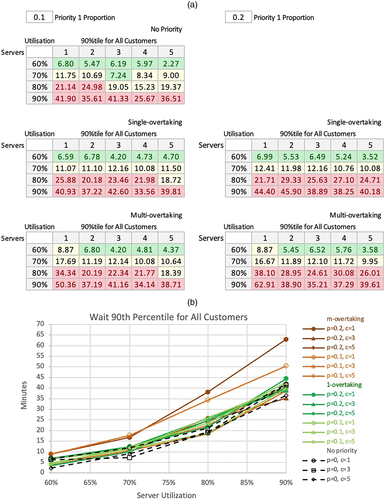
Notes. (a) Wait 90th percentile for all customers. (b) Wait 90th percentile for all customers.
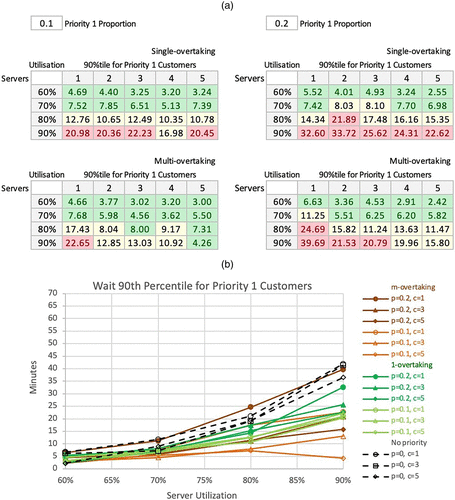
Notes. (a) Wait 90th percentile for priority 1 customers. (b) Wait 90th percentile for priority 1 customers.
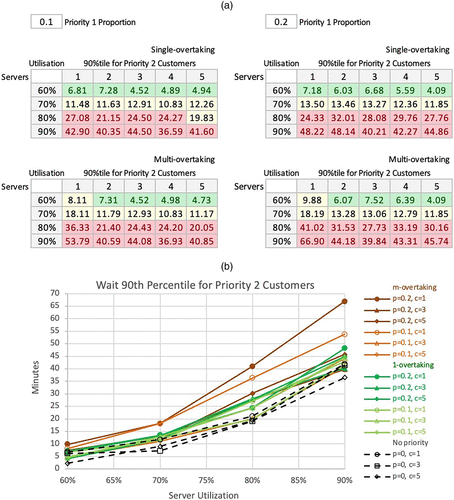
Notes. (a) Wait 90th percentile for priority 2 customers. (b) Wait 90th percentile for priority 2 customers.
Appendix E. Preliminary Analysis Tables and Charts (Continued 2)
More tables and charts of the simulation results, comparing the different approaches, are given below. For comparison of service performance, we define two wait ratios.
The first is a multi- versus single-overtaking, and the second is on priority versus no-priority queuing. Conditional formatting thresholds: green = less than 1; red = more than 1.

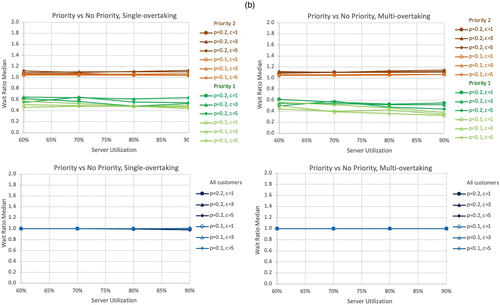
Notes. (a) Wait ratio 1 (priority versus no priority) comparisons. (b) Wait ratio 1 (priority versus no priority) comparisons.
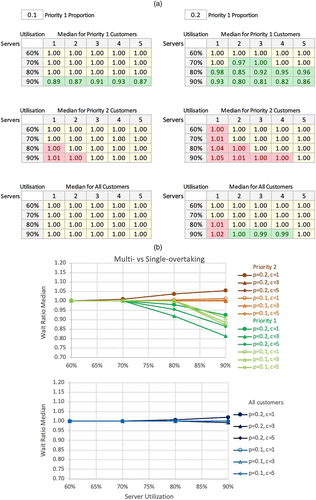
Notes. (a) Wait ratio 2 (multi- versus single-overtaking) comparisons. (b) Wait ratio 2 (multi- versus single-overtaking) comparisons.
References
- (2001) VBA for Modelers: Developing Decision Support Systems with Microsoft® Excel (Duxbury).Google Scholar
- (1999) Spreadsheet modeling and simulation improves understanding of Queues. Interfaces 29(3):88–103.Link, Google Scholar
- (2002) Graphical spreadsheet simulation of queues. INFORMS Trans. Ed. 2(2):27–39.Link, Google Scholar
- (2007a) Monte Carlo spreadsheet simulation using resampling. INFORMS Trans. Ed. 7(3):188–200.Link, Google Scholar
- (2007b) Simpler spreadsheet simulation of multi-server queues. INFORMS Trans. Ed. 7(2):172–177.Link, Google Scholar
- (2008) Teaching business modeling using spreadsheets. INFORMS Trans. Ed. 9(1):20–34.Link, Google Scholar
- (2015) Business Modeling with Spreadsheets: Problems, Principles and Practice, 3rd ed. (McGraw-Hill).Google Scholar
- (2008) Spreadsheet data resampling for Monte-Carlo simulation. Spreadsheet Ed. 3(1):70–78.Google Scholar
- (2020) Simpler machine learning using spreadsheets: Neural network predict. Eur. J. Engrg. Formal Sci. 4(1):124–138.Crossref, Google Scholar
- (2019) Practical Management Science, 6th ed. (Cengage).Google Scholar